

Rated the best free VPN for Windows by RTINGS — and we didn't even pay them.
What You Get for Free (and What Pro Adds)
Why is it actually free?
Privacy You Don't Have to Take Our Word For
Our no-logs policy was tested in an actual court case. We had nothing to hand over, because we keep nothing.
Over 100 million users chose Windscribe. Come see why.
Loved & Trusted by Over 100 Million Users
Set up Windscribe on Windows in Seconds: See How
Built Natively for Windows 10, 11, and ARM
Windscribe runs natively on Windows 10 and 11 (64-bit), with deep OS integration — the Firewall is built on native Windows Filtering Platform APIs, not bolted on top.
Got a Snapdragon-powered Copilot+ PC or a Surface? We were one of the first VPNs with a native ARM64 build, including a native split tunneling driver. No emulation, no excuses.
- Operating system: Windows 10, Windows 11
- Architecture: x64 and native ARM64
- Auto-start: Launches with Windows
- Footprint: Lightweight, self-updating

Firewall — Eliminate the Chance of Any Kind of Leak
Windscribe Firewall, sometimes incorrectly called a "kill switch," uses native OS APIs to block all connectivity outside of the tunnel. If your tunnel drops for any reason, the chance of leaks is completely eliminated — superior to a reactive kill switch, which cannot guarantee your IP won't leak.
Reactive Kill Switch
VPN drops → app reacts
Windscribe Firewall
Gate never opens
Here's the difference in practice: your VPN app crashes mid-download. A kill switch has to notice the crash, then react — and in that gap, packets escape with your real IP on them. The Windscribe Firewall never opened the gate in the first place. Nothing leaves your PC outside the tunnel, even if the app itself dies.
Independent reviewers have tested this against DNS, IPv6, and WebRTC leaks. Spoiler: they found none.
Download for Windows

Streaming

Gaming

File Sharing

Public Wi-Fi
Latest next-generation VPN protocol that offers record-breaking speeds. Connect on 6 different ports.
Offers fastest connection times and high speeds on most networks.
OpenVPN over TCP. Helpful on restrictive networks. Connect on 11 different ports.
OpenVPN over UDP. The de facto VPN standard for years. Connect on 6 different ports.
OpenVPN masked to look like HTTPS traffic. Helpful on restrictive networks. Connect on 11 ports.
OpenVPN masked to look like WebSocket traffic. Helpful on restrictive networks.
Control Exactly How You Connect
Meet R.O.B.E.R.T.: our DNS-level blocker that stops ads, trackers, and malware domains before they ever reach your PC. Unlike a browser extension, it covers everything: every app, every game launcher, every sketchy installer that phones home. Core blocking is included on the free plan; Pro unlocks full customization and custom rules. The internet, minus the garbage.

There are cases when you don't wish to tunnel all your traffic through a VPN. Windscribe offers 2 Split Tunneling types, and 2 modes for each one.

When you use public Wi-Fi, the operators will usually store your MAC address in some database. This allows them to track you when you return to the same network, or track you across different networks operated by the same company. MAC spoofing prevents that by generating a new MAC address on every single network.

Proxy Gateway creates a secure HTTP or SOCKS5 proxy server on your computer. Any device on your network can use this proxy server to make requests over the tunnel. Handy for devices that don't support VPNs.

Create custom rules for different Wi-Fi networks. As soon as you join a new network, Windscribe can act — automatically connecting or disconnecting, or connecting via a specific protocol.

Import any OpenVPN or WireGuard config and use it as if it's a Windscribe location. You don't even need a Windscribe account: click the icon from the splash screen. No other VPN app does this.

Terminate all existing TCP sockets when connecting to the VPN.
Helps improve speeds on some networks.
Share your secure Windscribe connection wirelessly.
A self-updating app keeps you on the latest and greatest.
Use any 3rd party DNS server instead of our built-in R.O.B.E.R.T.
Get connected even on the most restrictive networks.
Use custom images as skins and gain 69% better performance.






Frequently Asked Questions About VPN for Windows
Does Windows have a built-in VPN?


Windows 10 and 11 include a built-in VPN client, but not a VPN service. It can connect to a VPN you already have — it does not give you servers, encryption infrastructure, or leak protection on its own. To actually use a VPN on Windows, you need a service like Windscribe: download the app, click connect, done.
Is there a free VPN for Windows?
Yes — Windscribe. Create an account, download the Windows app, and connect. You get 10 GB of data per month with a confirmed email, servers in 10 countries, and the exact same app and security features as our paid users. No credit card required.
How much data do you get with Windscribe's free Windows VPN?
10 GB per month with a confirmed email address, or 2 GB without one. You can add 5 GB more every month just by tweeting about us, and earn permanent bonus data through referrals. Need unlimited? Pro is $69/year, or build your own plan from $3/month.
Is Windscribe's free VPN safe to use on Windows?
Yes. Free runs on the same infrastructure, encryption, Firewall, and apps as Pro. Our desktop apps are open source, independently audited, and our no-logs policy has been tested in an actual court case. Free users are not the product — free is how we market Pro.
How do I choose the best VPN for Windows?
Look for strong security, a large network, a no-logs policy, and user-friendly software. Windscribe offers robust encryption, unlimited device connections, and a wide range of servers, making it a reliable option for privacy and streaming needs.
Does Windscribe work on Windows 11?
Yes. Windscribe runs natively on Windows 10 and 11 (64-bit). If you are on an older version of Windows, check our Change Log page for legacy builds.
Does Windscribe work on Copilot+ PCs and Windows ARM devices?
Yes — natively. Windscribe ships a dedicated ARM64 build of the Windows app, including a native split tunneling driver, so it runs at full speed on Snapdragon-powered Copilot+ PCs and Surface devices without emulation. Download the ARM version directly from our website.
How do I install a VPN on Windows?
First, sign up for a Windscribe account. Then download the Windscribe Windows app and run the installer. Press "Install" and, once it's done, press "Login". Log in, pick a location, and connect. Check out our detailed Windows setup guide for a step-by-step process.
How do I turn on and use the VPN on my PC?
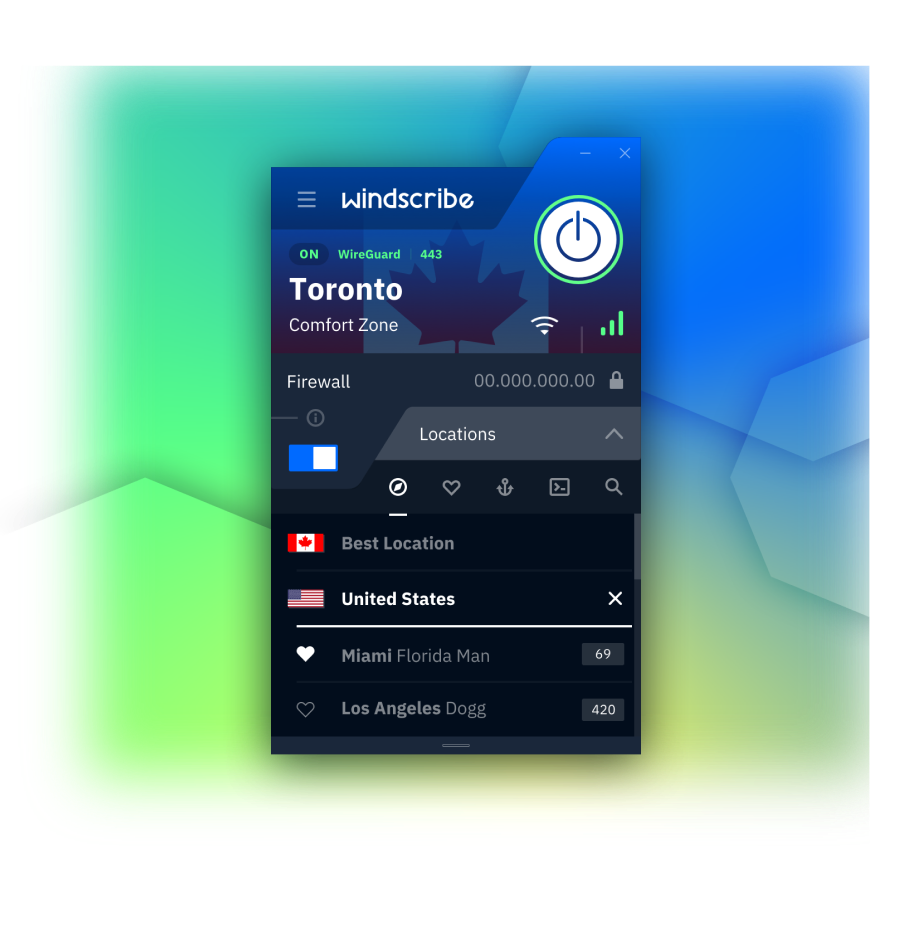
Open the app and hit the big ON button. That is genuinely it. You can also set Windscribe to auto-connect when Windows starts, or create Network Rules so it connects automatically whenever you join an untrusted Wi-Fi network.
How do I change my VPN location on Windows?
Click the location list in the app and pick another server — you'll switch in seconds. Switching to Windscribe from another VPN? Uninstall the old one first to avoid network driver conflicts, then install Windscribe.
Will a VPN slow down my Windows PC?
A little — every VPN adds some overhead, and anyone claiming otherwise is selling something. With WireGuard, the difference is usually small enough that you won't notice it while browsing, streaming, or gaming. If a connection feels slow, switching protocols or ports usually fixes it.
"WireGuard" is a registered trademark of Jason A. Donenfeld. Open Source Software Attributions.